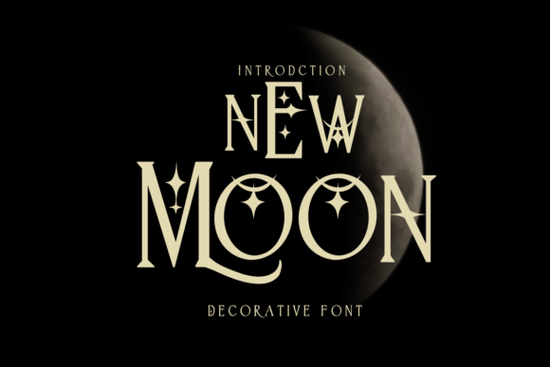
If you need a handwritten-style typeface that feels relaxed but still readable, New Moon Font fits that niche nicely. It is a decorative script designed for everyday creative work, from journaling and greeting cards to print-on-demand merchandise and social media graphics. The letterforms carry a soft, casual rhythm that works well when you want your design to feel personal without looking overly polished.
What makes this decorative typeface stand out?
Unlike heavily stylized display fonts that struggle at smaller sizes, this typeface keeps a balanced x-height and open counters. That means you can use it for short headlines, quote overlays, or product labels without sacrificing legibility. The strokes have a gentle variation that mimics pen-on-paper writing, which helps your designs feel approachable. If you enjoy working with organic shapes and hand-drawn elements, you will notice how smoothly it integrates into layered compositions. Designers who prefer a softer alternative to rigid sans-serifs often pair it with clean supporting text, and you can explore similar handwritten styles by browsing our collection of playful decorative lettering when you need a different mood.
Which projects work best with this style?
Because the characters carry a relaxed, diary-like feel, this font shines in projects that rely on a personal touch. You will get the most value when you apply it to designs that benefit from a handwritten aesthetic:
- Greeting cards and stationery – perfect for cover quotes, inside messages, and envelope addressing
- Print-on-demand products – works cleanly on mugs, tote bags, and t-shirts when sized appropriately
- Social media graphics – ideal for story overlays, Pinterest pins, and short promotional banners
- Journaling and note-taking templates – adds warmth to printable planners, habit trackers, and diary covers
When you are building a brand kit or a seasonal product line, consistency matters. This typeface keeps a steady visual tone across different formats, which saves time when you are adapting one design for multiple platforms. If you want to see how it fits alongside other script options, you can compare it with the layouts featured on our decorative font showcase to find the right match for your niche.
How do I install and pair it with other typefaces?
After downloading the font files, installation takes less than a minute on both Windows and Mac. Simply unzip the folder, double-click the .ttf or .otf file, and select install. Once it appears in your font manager, you can access it in Canva, Illustrator, Photoshop, Cricut Design Space, or any standard design software. For the cleanest results, stick to short phrases or single-line headings. Let a simple sans-serif or light serif handle the body copy so the decorative letters remain the focal point.
If you are sourcing typefaces for commercial work, always verify the licensing terms before publishing. You can check the latest usage rights and download options for New Moon Font directly on the marketplace. Keeping a record of your license files makes it easier to handle client requests or platform audits later on.
What should I check before adding it to your toolkit?
Not every decorative script works for every project, so it helps to run a quick test before committing. Print a sample at the actual size you plan to use, especially if you are creating physical products like stickers or apparel. Check how the letters render on dark backgrounds versus light ones, and verify that special characters, numbers, and punctuation display correctly in your design program. If you notice spacing issues, adjust the tracking slightly or add manual kerning between specific letter pairs. Small tweaks often make the difference between a rushed layout and a polished final product.
For crafters and small business owners, file organization is just as important as the design itself. Keep your font files in a dedicated folder, label them clearly, and note which projects they were used for. This habit prevents version conflicts and speeds up future revisions when customers request reprints or seasonal updates.
Quick pre-launch checklist:
- Confirm the license covers your intended use (personal, commercial, or POD)
- Test print at 100% scale to check readability and stroke weight
- Pair with a neutral body font and limit decorative text to 1–2 lines
- Export a PNG and PDF sample to verify how the font renders across devices
- Save your license receipt and font files in a backed-up project folder
Run through these steps before publishing, and you will avoid common formatting issues while keeping your workflow smooth and predictable.
Learn More Get Creative with Butterfly Font Projects
 Bold Fonts for Kids: Creative Projects & Design Ideas
 Monarch Heritage Font for Your Design Projects
 Typography Projects: Using the Trup & Tomp Font
 Craft Elegant Projects with Fishtail Monogram Font
 Think Loved Font: Perfect for Personal and Creative Projects