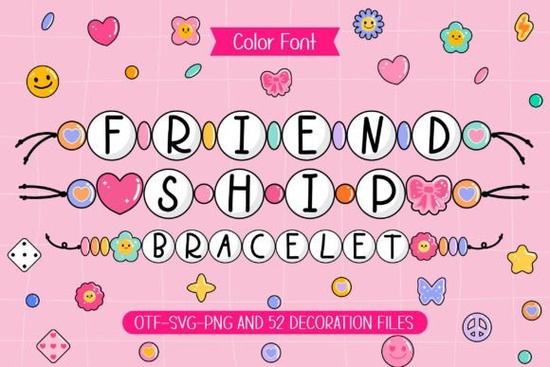
If you need a typeface that feels warm, handmade, and a little nostalgic, the Friendship Bracelet Font delivers exactly that. Designed to look like strings of colorful beads, each character carries the cheerful energy of summer camp trades and craft fairs. It arrives as a standard OTF file and includes matching doodle cliparts, so you can build layouts without hunting for extra graphics.
What makes this bead-style typeface work for crafts?
The letterforms use rounded, evenly spaced shapes that mimic craft beads. That structure reads clearly on fabric, cardstock, and packaging. Soft curves and consistent widths hold up well on vinyl plotters and cotton prints. The included doodles frame short quotes without clutter, saving design time for market sellers and small shop owners.
If you enjoy working with bright, craft-friendly typefaces, you will notice how this style keeps projects feeling light. The bead effect avoids heavy outlines, so your files stay clean and cutters run smoothly.
Which projects fit a playful lettering style?
This font shines when the goal is connection or celebration. Here are reliable uses:
- Apparel and totes: Short phrases print clearly on shirts and canvas.
- Scrapbooking: Rounded letters pair well with patterned paper and photos.
- Greeting cards: Birthdays and friendship events get a handmade feel.
- Stickers: Consistent bead spacing scales down for small die-cuts.
- Teacher gifts: Name labels and notes look polished but personal.
Keep text short. The bead detail reads best at larger sizes, and limiting lines to three or five words prevents crowded layouts.
How do you install and use the OTF file?
Install the OTF file and restart your software if needed. In Illustrator or Cricut Design Space, type your text, select the typeface, and adjust tracking to bring beads closer. Cliparts drag and drop like standard graphics. Always convert text to outlines before cutting to lock shapes and prevent substitution errors.
If you prefer testing different lettering styles before finalizing a mockup, you can also browse options like the hand-drawn crayon collection to see how texture changes your layout.
What should you pair it with for balanced layouts?
Pair the bead design with a clean sans serif for supporting text. A simple font handles dates or care instructions while the display typeface stands out. Stick to two typefaces per project. Use high-contrast colors like navy on cream for sharp readability. Place doodles at word ends instead of stacking them over letters.
You can preview examples and download the official files through Friendship Bracelet Font on Creative Fabrica. The listing covers licensing for personal and commercial use, which matters if you sell finished goods.
Quick setup checklist before you print or cut
- Install the OTF file and restart your software.
- Set text size between 48pt and 120pt for clear beads.
- Adjust letter spacing if words feel loose.
- Convert text to outlines before vinyl cutting.
- Test print on your final material to check contrast.
- Review the commercial license before selling.
Start with a three-word phrase, add one doodle, and run a test cut. Once spacing and colors look right, adapt the layout across shirts, cards, and stickers without rebuilding.
Learn More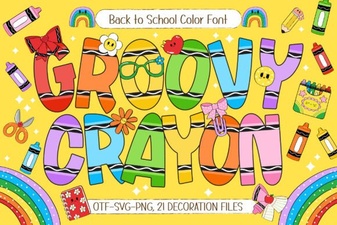 Groovy Crayon: a Creative Font for Playful Projects
 Bold Fonts for Kids: Creative Projects & Design Ideas
 Monarch Heritage Font for Your Design Projects
 Typography Projects: Using the Trup & Tomp Font
 Craft Elegant Projects with Fishtail Monogram Font
 Think Loved Font: Perfect for Personal and Creative Projects